Cycle between Windows:
I used to use the Alt + Tab keys to move between Windows Vista/XP/etc, but that doesn't work so well in Windows 7. If you linger on a Window for a second too long, you'll switch to that Window when all you want to do is continue to scan the Window before selecting. Awkward. So now I use Windows Key + Tab which is just OK, but better than Alt + Tab.
Minimize all Windows:
Windows Key + M
Focus cursor in the address box of browser:
CTRL + L
Wednesday, July 6, 2011
✔ Inserting Symbols in Twitter or Facebook
Update 5/25/2015:
Go to this link instead - good stuff!
How to Add Cool Symbols Like These to Your Tweets
I especially like section #7, "What Do All Those Symbols Mean, Anyway?"
7/6/2011:
✈ ♫ ♪ ♬ ♩ ♥ ♡ ☺☹ ✩ ★ ✉ ◄ ► • … º * ‼ – — ½ ¼ € £ ¿ ¡ © ® ™ ✔ ✗ ☑ ☒ ♂ ☛ ✖ ↑ ✏ ♀ ☼ ☄ ↓ ≈ ✍ ☀ ☁ ☂ ☃ ≠ ± ☮ ☯ ▐ ≤ ≥ ∞ ✺ ✽ ✵ ☠ ♟ ♞ ♝ ♜ ♛ ♚ ♙ ♘ ♗ ♖ ♕ ♔ ♠ ♦ ♣ ☠ ❝ ❞ ◉ ➲ ➔ ⇦ ⇨ ⇧ ⇩
⓪ ① ② ③ ④ ⑤ ⑥ ⑦ ⑧ ⑨ ⑩
❶ ❷ ❸ ❹ ❺ ❻ ❼ ❽ ❾ ❿
ⒶⒷⒸⒹⒺⒻⒼⒽⒾⒿⓀⓁⓂⓃⓄⓅⓆⓇⓈⓉⓊⓋⓌⓍⓎⓏ
ⓐⓑⓒⓓⓔⓕⓖⓗⓘⓙⓚⓛⓜⓝⓞⓟⓠⓡⓢⓣⓤⓥⓦⓧⓨⓩ
← ↑ → ↓ ↔ ↕ ↖ ↗ ↘ ↙ ↰ ↱ ↲ ↳ ↴ ↵ ↶ ↷
♈ ♉ ♊ ♋ ♌ ♍ ♎ ♏ ♐ ♑ ♒ ♓ (Zodiac Signs)
I'd simply cut/paste vs. remembering the keyboard sequence to make these.
 This work is licensed under a Creative Commons Attribution-NonCommercial-NoDerivs 3.0 Unported License. This post has been scraped in violation of that license if you are reading this post on other than http://www.digital-qa.blogspot.com/.
Go to this link instead - good stuff!
How to Add Cool Symbols Like These to Your Tweets
I especially like section #7, "What Do All Those Symbols Mean, Anyway?"
7/6/2011:
✈ ♫ ♪ ♬ ♩ ♥ ♡ ☺☹ ✩ ★ ✉ ◄ ► • … º * ‼ – — ½ ¼ € £ ¿ ¡ © ® ™ ✔ ✗ ☑ ☒ ♂ ☛ ✖ ↑ ✏ ♀ ☼ ☄ ↓ ≈ ✍ ☀ ☁ ☂ ☃ ≠ ± ☮ ☯ ▐ ≤ ≥ ∞ ✺ ✽ ✵ ☠ ♟ ♞ ♝ ♜ ♛ ♚ ♙ ♘ ♗ ♖ ♕ ♔ ♠ ♦ ♣ ☠ ❝ ❞ ◉ ➲ ➔ ⇦ ⇨ ⇧ ⇩
⓪ ① ② ③ ④ ⑤ ⑥ ⑦ ⑧ ⑨ ⑩
❶ ❷ ❸ ❹ ❺ ❻ ❼ ❽ ❾ ❿
ⒶⒷⒸⒹⒺⒻⒼⒽⒾⒿⓀⓁⓂⓃⓄⓅⓆⓇⓈⓉⓊⓋⓌⓍⓎⓏ
ⓐⓑⓒⓓⓔⓕⓖⓗⓘⓙⓚⓛⓜⓝⓞⓟⓠⓡⓢⓣⓤⓥⓦⓧⓨⓩ
← ↑ → ↓ ↔ ↕ ↖ ↗ ↘ ↙ ↰ ↱ ↲ ↳ ↴ ↵ ↶ ↷
♈ ♉ ♊ ♋ ♌ ♍ ♎ ♏ ♐ ♑ ♒ ♓ (Zodiac Signs)
I'd simply cut/paste vs. remembering the keyboard sequence to make these.
This work is licensed under a Creative Commons Attribution-NonCommercial-NoDerivs 3.0 Unported License. This post has been scraped in violation of that license if you are reading this post on other than http://www.digital-qa.blogspot.com/.
0
comments

 Labels:
Symbols
Labels:
Symbols
 Labels:
Symbols
Labels:
Symbols
Tuesday, July 5, 2011
Sony VAIO VPCSC1AFM - Thumbs Down (but I'm keeping it)
As you can see further below, I wound up keeping this machine. I'll share the not so great stuff as it happens.
11/1--
Forgot to mention one of my pet peeves about all Sony VAIO machines.... VOLUME. Don't understand why the max volume is so low on Sony machines.
I guess I'm done with PC's... My next machine will be a MAC. Now that I can access my work via the MAC, there is nothing keeping me tied to Microsoft.
LOL... this is stamped on my VAIO , "Dolby Home Theater".
7/27--
Some cool things about this machine: http://funlimited.co.uk/tag/vpcsc1afm/
7/20--
Original Post:
My 2 year-old Sony VAIO VGN-Z610Y finally disintegrated. It always ran hot, but it started getting sizzling hot and then turning itself off. Finally it just wouldn't stay on at all. Thinking I'd clear out some accumulated dust to keep the heat down, I opened the machine to find not much dust at all. (It did stay on longer with the machine wide open... but not very practical... :)
I wanted to wait for the new super cool Sony VAIO Z but looks like it will be a few months longer for it to debut here in the states. It's getting stellar reviews.
So I bought the only other available 13", the Sony VAIO VPCSC1AFM from Best Buy. But it's going back (even though the 15% restocking fee). I will somehow make the fried laptop work (USB keyboard and mouse!) until the new Z arrives. Keeping my eye on www.engadet.com - they seem to be the first to know about these types of things.
Here is the problem with Best Buy's (I now understand proprietary!) Sony VAIO VPCSC1AFM/S:
Even with the screen tilted as far back as it can go, the text is lighter than it should be. If you scrunch down and look up the screen or lift the front of the laptop (in effect tilting the screen back further) you can see the text becomes nice and dark. Tweaking the contrast will not fix this - the screen tilt is just off. It'sespecially noticeable when compared side by side with my VGN-Z610Y. Setting the machine on a platform helps but then it's weird typing while it's elevated. Sigh.
7/18 - Decided to keep the machine. I just didn't want to be bothered with returning it and re-imaging yet another computer. The screen display is not that great. The rest is OK. It's $1K vs. the $2K+ I would've spent on the new 2011 Vaio Z. Something tells me it's going to cost me to keep this machine however...
Other's take on the machine:
4-hour battery life
Also includes Geek Squad Support for 90 days
2-year extended warranty
Model vpcsc
Press release describing the warranty, etc: http://digital-qa.blogspot.com/2011/08/best-buy-blue-label-press-release.html
11/1--
Forgot to mention one of my pet peeves about all Sony VAIO machines.... VOLUME. Don't understand why the max volume is so low on Sony machines.
I guess I'm done with PC's... My next machine will be a MAC. Now that I can access my work via the MAC, there is nothing keeping me tied to Microsoft.
LOL... this is stamped on my VAIO , "Dolby Home Theater".
7/27--
Some cool things about this machine: http://funlimited.co.uk/tag/vpcsc1afm/
7/20--
- The screen is quite crappy (details further below). In addition to the text that's not quite dark enough unless you hunchback and look up the screen, it's also just not very rich.
- Too easy to hit the Shut Down button instead of the Delete Key (lost work will happen!)
- The touch-pad intermittently stops working. Most of the time I have to shut down the laptop to regain touch-pad access. Fn + F1 doesn't work to reactivate the touch-pad. Strange.
7/21--
Just to note, if you buy from Best Buy. These Blue Label laptops come with an extended 2 year warranty and you can read about it here on Best Buy's web site. The sales force is relentless about pushing their own Extended Warranty (or "performance service plans" as Best Buy likes to call them) and they will not mention this extended warranty that is already included.
My 2 year-old Sony VAIO VGN-Z610Y finally disintegrated. It always ran hot, but it started getting sizzling hot and then turning itself off. Finally it just wouldn't stay on at all. Thinking I'd clear out some accumulated dust to keep the heat down, I opened the machine to find not much dust at all. (It did stay on longer with the machine wide open... but not very practical... :)
I wanted to wait for the new super cool Sony VAIO Z but looks like it will be a few months longer for it to debut here in the states. It's getting stellar reviews.
So I bought the only other available 13", the Sony VAIO VPCSC1AFM from Best Buy. But it's going back (even though the 15% restocking fee). I will somehow make the fried laptop work (USB keyboard and mouse!) until the new Z arrives. Keeping my eye on www.engadet.com - they seem to be the first to know about these types of things.
Here is the problem with Best Buy's (I now understand proprietary!) Sony VAIO VPCSC1AFM/S:
Even with the screen tilted as far back as it can go, the text is lighter than it should be. If you scrunch down and look up the screen or lift the front of the laptop (in effect tilting the screen back further) you can see the text becomes nice and dark. Tweaking the contrast will not fix this - the screen tilt is just off. It'sespecially noticeable when compared side by side with my VGN-Z610Y. Setting the machine on a platform helps but then it's weird typing while it's elevated. Sigh.
7/18 - Decided to keep the machine. I just didn't want to be bothered with returning it and re-imaging yet another computer. The screen display is not that great. The rest is OK. It's $1K vs. the $2K+ I would've spent on the new 2011 Vaio Z. Something tells me it's going to cost me to keep this machine however...
Other's take on the machine:
- 5/30 - My Best Buy Blue Label laptop adventure: Sony Vaio VPCSC1AFM/S
- 6/15 - It aint easy to choose a Laptop: Sony Vaio VPCSC1AFM/S
- 4/18 - Best Buy slaps Blue Label on Sony and Toshiba laptops, packed to the exhaust vents with extras -- Engadget: "you could save yourself some cash by skipping on these pre-configured models and going with a customized rig from Sony or Toshiba directly."
- 4/18 - Best Buy slaps Blue Label on Sony and Toshiba laptops, packed to the exhaust vents with extras | Daddies Relaxes Pan Heads Outback: "A built-in Blu-Ray drive and Wireless Display technology with push button streaming to provide easy transfer of content from the laptop to the TV in 1080p without wires. Included in the package is the NETGEAR Push2TV? adapter that connects to the HDMI port on the television."
- 4/16 - Best Buy Debuts Exclusive ‘Blue Label’ Laptops | PCWorld
4-hour battery life
Also includes Geek Squad Support for 90 days
2-year extended warranty
Model vpcsc
Press release describing the warranty, etc: http://digital-qa.blogspot.com/2011/08/best-buy-blue-label-press-release.html
2
comments
Labels:
Best Buy
,
Vaio
Labels:
Best Buy
,
Vaio
Monday, July 4, 2011
How to Delete ALL your Yahoo Email at Once
In the new version of Yahoo Mail (not the 'classic' version):
1- Click the "Switch View" box
2- Select "In Scrolling List (Hide Preview)"
3- Click the little checkbox directly under "Delete"
4- Click "Delete"
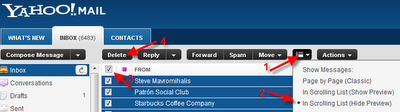
5- Click "OK", and there they go...

This work is licensed under a Creative Commons Attribution-NonCommercial-NoDerivs 3.0 Unported License. This post has been scraped in violation of that license if you are reading this post on other than http://www.digital-qa.blogspot.com/.
1- Click the "Switch View" box
2- Select "In Scrolling List (Hide Preview)"
3- Click the little checkbox directly under "Delete"
4- Click "Delete"

5- Click "OK", and there they go...
 This work is licensed under a Creative Commons Attribution-NonCommercial-NoDerivs 3.0 Unported License. This post has been scraped in violation of that license if you are reading this post on other than http://www.digital-qa.blogspot.com/.
3
comments
Labels:
Yahoo Mail
Labels:
Yahoo Mail
Coffee Break: Simply Marking the Passage of my old Vaio Z
The laptop was quite pricey and lasted just over 2 years. RIP:
+Sony VAIO VGN-Z610Y Laptop
+Windows Vista Ultimate 64-bit OS
+Sony VAIO VGN-Z610Y Laptop
+Windows Vista Ultimate 64-bit OS
0
comments
Labels:
Coffee Break
,
Sony VAIO
Labels:
Coffee Break
,
Sony VAIO
Sunday, July 3, 2011
Blogger - How to Remove too much Space between Paragraphs
Here's how to remove that extra space:
In Compose mode (not HTML), select everything, then click the T with the red X on it on the toolbar.

Then manually delete the extra lines. Now there is only one line between paragraphs.
This work is licensed under a Creative Commons Attribution-NonCommercial-NoDerivs 3.0 Unported License. This post has been scraped in violation of that license if you are reading this post on other than http://www.digital-qa.blogspot.com/.
In Compose mode (not HTML), select everything, then click the T with the red X on it on the toolbar.

Then manually delete the extra lines. Now there is only one line between paragraphs.
It may still look like lots of space but is definitely less and is truly equivalent to the other lines. :)
UPDATE 7/20/2011: Realize that's only a fix for a single blog post and am looking for a "permanent" fix. I just adjusted this setting and hoping that works: Select Dashboard, Settings, Formatting, and change "Convert line breaks" to "Yes". Will let you know...
UPDATE 3/31/2012: Not had a chance to look at this but this looks promising. Look at the toolbar at the top of the post. It is possible your text is not set to Normal and that is what is causing the extra spaces:

UPDATE 7/20/2011: Realize that's only a fix for a single blog post and am looking for a "permanent" fix. I just adjusted this setting and hoping that works: Select Dashboard, Settings, Formatting, and change "Convert line breaks" to "Yes". Will let you know...
UPDATE 3/31/2012: Not had a chance to look at this but this looks promising. Look at the toolbar at the top of the post. It is possible your text is not set to Normal and that is what is causing the extra spaces:
This work is licensed under a Creative Commons Attribution-NonCommercial-NoDerivs 3.0 Unported License. This post has been scraped in violation of that license if you are reading this post on other than http://www.digital-qa.blogspot.com/.
6
comments
Labels:
Blogger
Labels:
Blogger
Saturday, July 2, 2011
How to see the Pictures you've Posted to a Flickr Group
To see the pictures you've posted to a group, first you'll need your Flickr ID (it is not the same as your Flickr user name). Use this great tool to determine your ID, and then in the link you see below replace everything after the /7519222@N05 with your ID.
http://www.flickr.com/groups/transbayterminal/pool/7519222@N05
http://www.flickr.com/groups/transbayterminal/pool/7519222@N05
2
comments
Labels:
Flickr
Labels:
Flickr
Friday, July 1, 2011
Here is where to find Myspace Privacy Settings
Finally found the privacy settings here: Myspace Privacy Settings. You'll need to be logged in to get to the settings (of course...).
0
comments
Labels:
Myspace
Labels:
Myspace
Change Download Location Default
This is done within the browser. Here is how to do it in Chrome, IE and Firefox.
In Chrome, click the wrench in the upper right hand corner, "Options", "Under the hood", and beside "Download" change "Download location:" to the directory you'd prefer your downloads to go to (e.g. C:\Users\rls\Downloads).
You can also check/uncheck the option: "Ask where to save each file before downloading".
You can also clear any auto-opening settings you've previously defined here.
In IE, from the menu bar click on "Tools", "View Downloads". At the bottom left hand, click on "Options". Browse and select your preferred download folder here.
In Firefox, Tools, Options, General, Downloads,
In Chrome, click the wrench in the upper right hand corner, "Options", "Under the hood", and beside "Download" change "Download location:" to the directory you'd prefer your downloads to go to (e.g. C:\Users\rls\Downloads).
You can also check/uncheck the option: "Ask where to save each file before downloading".
You can also clear any auto-opening settings you've previously defined here.
In IE, from the menu bar click on "Tools", "View Downloads". At the bottom left hand, click on "Options". Browse and select your preferred download folder here.
In Firefox, Tools, Options, General, Downloads,
0
comments
Labels:
Downloads
Labels:
Downloads
Which Version of Excel Do I Have?
In Excel 2007 or 2010, click on the Office-logo Button at the top-left, then click on the "Excel Options" button (it's at the BOTTOM right of that dialog box), then choose "Resources", then the "About" button.
In earlier versions of Excel, simply click "Help", then "About Microsoft Excel".
This work is licensed under a Creative Commons Attribution-NonCommercial-NoDerivs 3.0 Unported License. This post has been scraped in violation of that license if you are reading this post on other than http://www.digital-qa.blogspot.com/.
In earlier versions of Excel, simply click "Help", then "About Microsoft Excel".
This work is licensed under a Creative Commons Attribution-NonCommercial-NoDerivs 3.0 Unported License. This post has been scraped in violation of that license if you are reading this post on other than http://www.digital-qa.blogspot.com/.
1 comments
Labels:
Excel
Labels:
Excel
Subscribe to:
Posts (Atom)

.JPG)

 Posts
Posts

